
Overview of Computerised Accounting System | CBSE Class 12 Accountancy Notes
On this page
This note covers computerised accounting, data and information, the accounting cycle, software features, grouping and coding of accounts, coding structures, software activities, data security, advantages and limitations, and accounting information sub-systems.
What is a Computerised Accounting System?
Definition: A Computerised Accounting System (CAS) processes accounting transactions using computer hardware and software to produce accounting records and reports.
A transaction is a record of the inflow and outflow of resources. CAS takes accounting transactions as inputs, processes them through accounting software and produces information. Its purpose extends from entering transactions to producing the records and reports required by the business.
Information Technology (IT), meaning technology used to process and communicate information, enables quick, accurate and timely access to business information. This supports decision-making, strengthens the business's competitive position and enhances profitability.
Which five pillars support CAS?
| Component | Meaning and role |
|---|---|
| Procedure | A logical sequence of actions used to perform a task. |
| Data | Raw facts supplied as inputs to a business application. |
| People | The users who work with the system. |
| Hardware | The computer, its associated peripheral devices and their network. Peripheral devices are connected equipment; a network links computers and devices. |
| Software | Sets of instructions, including system software that forms part of the computer system and application software used for particular tasks. |
The user commands the hardware through software, and the hardware processes the data. Accounting software, such as Tally, is application software. Thus, the software used for accounting is one element within the wider system of people, procedures, data and equipment.
What the figure shows
Components of a computer
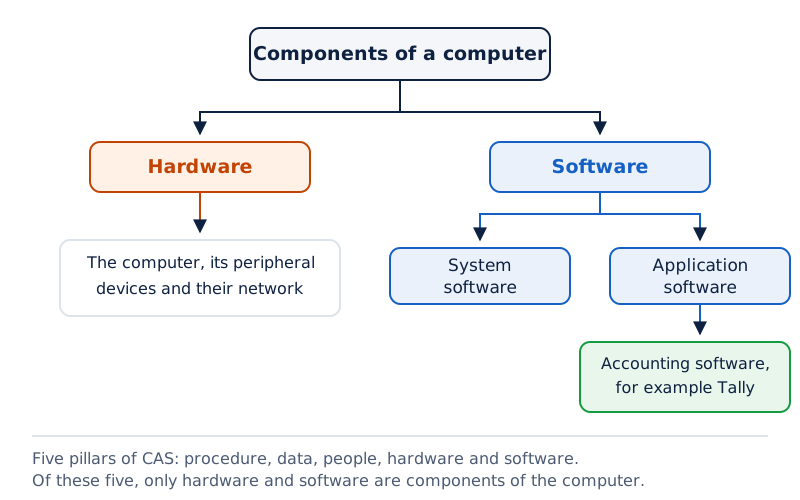
The top box branches into Hardware and Software. Software branches further into System Software and Application Software. The diagram distinguishes the computer's components from the five pillars of CAS.
Drawn by One Young India. See Fig. 1.1 in your NCERT textbook
How do accounting data become information?
A data item, also called a data element, is the smallest named unit of data in an information system. An information system processes data into useful information. An accounting transaction contains four data elements: account name, accounting code, transaction date and amount.
An account is a record relating to a particular accounting item; an accounting code is its identification mark. These details become inputs for processing. Information is the meaningful result produced when those inputs are processed for a user's requirements.
How do inputs and outputs differ?
| Aspect | Data | Information |
|---|---|---|
| Role | Raw items supplied for processing. | Results produced through processing. |
| Payment example | Days worked and rate per day. | Amount to pay after multiplying the inputs. |
| Accounting use | Elements of individual transactions. | Accounting records and reports generated from those elements. |
The distinction depends on the level of use. Information at one level may be viewed as data at another. When processed in the light of a decision maker's requirements, it becomes information at that further level.
Worked example 1. Days worked are 30 and the rate per day is Rs. 50, where Rs. means rupees. Identify the data and calculate the amount to pay.
Answer: The data are 30 days and Rs. 50 per day. Amount to pay = 30 × Rs. 50 = Rs. 1500. The multiplication sign × means multiply, and = means equals. Rs. 1500 is the resulting information.
What the figure shows
Days worked converted into amount to pay
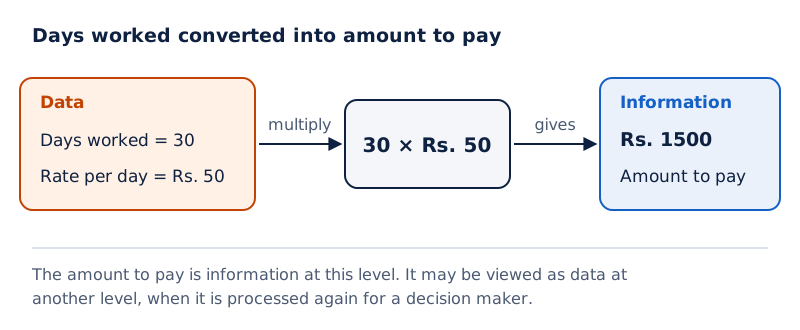
A Data arrow points towards 30 × Rs. 50 beneath Days Worked and Rate Per day. An Information arrow identifies the result, Rs. 1500, labelled Amount to pay.
Drawn by One Young India. See Fig. 1.3 in your NCERT textbook
What the figure shows
Data processed by accounting software
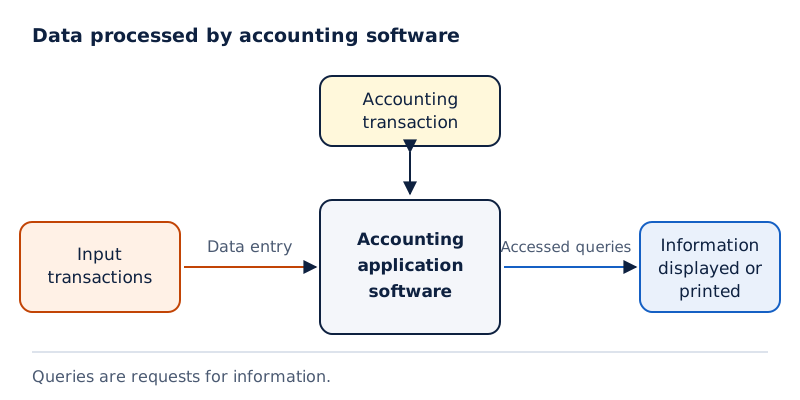
Input Transactions lead through Data Entry to Accounting Application Software. An arrow labelled Accessed queries leads to Information Displayed or Printed. The Accounting Transaction box above the software has arrows in both directions. Queries are requests for information.
Drawn by One Young India. See Fig. 1.2 in your NCERT textbook
How does CAS process the accounting cycle?
The accounting cycle comprises the processes used to identify, measure and communicate accounting information. Manual accounting is traditionally the most popular method of maintaining an organisation's financial transaction records. The same accounting cycle can be processed through computers.
Financial statements are the end products of accounting. They are prepared in accordance with Generally Accepted Accounting Principles (GAAP), the accepted principles governing accounting preparation. Computerisation changes the means of processing the cycle while retaining its accounting stages.
What is the sequence of processing?
- Analyse business transactions to identify the accounting information they contain.
- Record the transactions in the journal, the record in which transactions are first entered.
- Post journal entries to ledger accounts, the individual accounts into which recorded transactions are classified. Posting means transferring entries to these accounts.
- Prepare a trial balance, a statement drawn from the balances of the accounts.
- Review the accounts and make necessary adjustments, the changes required before preparing the final statements.
- Post the adjustments to the ledger and prepare an adjusted trial balance, which incorporates those changes.
- Use the adjusted trial balance to prepare the balance sheet and profit and loss account.
- Prepare the financial statements from the finally adjusted ledger and balance the accounts.
Which records and reports are produced?
CAS generates day books or journals, the ledger, the trial balance, the position statement and the statement of profit and loss. Day books record transactions, while the ledger arranges entries under their respective accounts.
The position statement, or balance sheet, presents assets and claims against the business. The statement of profit and loss, or profit and loss account, summarises income and expenses for an accounting period, the period covered by the accounts.
The sequence links individual entries with the final reports. A trial balance precedes account review; the adjusted trial balance follows the posting of adjustments. Keeping these stages distinct helps explain the complete flow from transaction analysis to financial statement preparation.
What salient features should CAS software provide?
The salient features of CAS concern integration, transparency, accuracy, scalability and reliability. Together they describe how accounting software should organise business information, support users and respond to changes in the business's size and processing requirements.
How do integration and transparency help?
Simple and integrated means that CAS is designed to automate and connect operations such as sales, finance, purchases, inventory and manufacturing. Inventory means stocks of items held by the business. Integration provides accurate, up-to-date business information rapidly.
CAS may be integrated with an enhanced Management Information System (MIS), a system generating and processing reports for management decisions. It may also include multi-lingual capabilities, meaning support for several languages, and data organisation capabilities to simplify business processes cost-effectively.
Transparency and control involve greater visibility of day-to-day operations and access to vital information. CAS provides sufficient time for planning, improves access to data and enhances user satisfaction. Access to relevant information supports the organisation's control over its operations.
How do accuracy, scalability and reliability help?
- Accuracy and speed: User-definable templates, meaning data entry screens or forms that users can define, support fast and accurate transaction entry. The software also helps generate required documents and reports.
- Scalability: The volume of data processing can change with the size of the business. The software can serve different business sizes and types of organisation.
- Reliability: Critical financial information generated by CAS is accurate, controlled and secured.
Each feature addresses a different need. Integration connects operations; transparency improves access; templates assist entry; scalability accommodates changing volumes; and reliability concerns the quality and security of financial information. These features should be explained separately even though they work together within CAS.
How does the accounting equation support grouping of accounts?
As transactions increase, the volume and size of business activity change, making proper classification necessary. Grouping of accounts means arranging accounting data in related categories. The accounting equation provides the basis for classifying the accounts embodied in transactions.
What do the symbols in the equation mean?
Assets are the business's resources. Equities are claims against those resources. Liabilities mean creditors' claims against the firm, while capital means owners' claims. Creditors are parties to whom the business owes amounts.
Let A denote assets, E equities, L liabilities and C capital. In the equations below, + means addition. The double-entry system recognises the two-sided effect of transactions and implies equality between assets and equities.
A = E
E = L + C
A = L + C
Owners' claims change with business success or failure, reflected in profit or loss. Revenue is an inflow of resources from selling goods or services in the normal course of business that increases capital. Expenses are resources consumed in generating revenues.
Profit is the excess of revenues over expenses; loss is the excess of expenses over revenues. The income statement summarises income and expenses for an accounting period. The equation can therefore incorporate revenues and expenses. In the following form, − means subtraction, and parentheses group the revenue less expense amount.
Assets = Liabilities + Capital + (Revenues − Expenses)
How are the major categories arranged?
| Major category | Grouping illustrated |
|---|---|
| Equity and liabilities | Shareholder's funds, meaning owners' funds; non-current liabilities, the longer-term liability group; and current liabilities, the short-term liability group. |
| Assets | Non-current assets, the longer-term asset group, and current assets, the short-term asset group. |
| Revenues | Sales and other income. |
| Expenses | Material consumed; salary and wages; manufacturing expenses; depreciation, meaning allocation of an asset's cost over its useful life; administrative expenses; interest, the cost of borrowing; and selling and distribution expenses. |
These groups and their components have a hierarchical relationship, meaning an arrangement from broader groups to more detailed sub-groups. Classification preserves that relationship so the detailed accounting information can be progressively summarised into the required financial statements.
Why are account codes arranged in a hierarchy?
Codification is the assignment of identification marks using letters or figures. An account head is the name under which an account is classified. The coding scheme should group account heads at different levels to support preparation of the balance sheet and profit and loss account.
A chart of accounts is the arranged list of account heads used by the accounting system. Its coding structure should follow the underlying hierarchy. The code therefore helps preserve the link between a broad group and the accounts belonging within it.
How can the first digits represent groups?
| Top-level code | Group |
|---|---|
| 1 | Equity and Liabilities |
| 2 | Assets |
| 3 | Revenues |
| 4 | Expenses |
| Parent group | Sub-group code | Sub-group |
|---|---|---|
| Equity and Liabilities | 11 | Shareholder's funds |
| Equity and Liabilities | 13 | Non-Current Liabilities |
| Equity and Liabilities | 14 | Current Liabilities |
| Assets | 21 | Non-Current Assets |
| Assets | 23 | Current Assets |
These are example allocations. The first digit identifies the top-level group; the additional digit identifies the sub-group. Listing account codes in ascending order, meaning increasing order, automatically lists them according to the desired hierarchy.
Note: Gaps in the second digit provide flexibility. The move from 11 to 13, and from 21 to 23, is deliberate within this scheme. Codes need not fill every consecutive position at every hierarchical level.
Worked example 2. In a coding scheme, 1 represents Equity and Liabilities; 11 represents Shareholder's funds; 13 represents Non-Current Liabilities; and 14 represents Current Liabilities. Identify the group and sub-group represented by 14.
Answer: Code 14 belongs to top-level group 1, Equity and Liabilities. Its complete two-digit code identifies Current Liabilities. The code places the sub-group within the broader group.
How do sequential, block and mnemonic codes differ?
Different coding methods serve different identification needs. Sequential codes assign numbers and/or letters in consecutive order. Block codes divide a range into sub-ranges allocated to specific groups. Mnemonic codes use letters or abbreviations as symbols for information.
Where are sequential codes useful?
Sequential codes are applied primarily to source documents, the documents supporting transactions, such as cheques and invoices. A cheque is an instruction to a bank to pay; an invoice records a sale or purchase. The sequence facilitates document searches and identification of missing codes.
| Code | Account |
|---|---|
| CL001 | GCERT LTD |
| CL002 | XYZ LTD |
| CL003 | ARIL CORPORATION OF INDIA |
Here the account names are labels, and CL001, CL002 and CL003 are their consecutive identification codes. A relevant document can be traced using its code, while a gap in a document sequence can identify a missing number for examination.
How do block and mnemonic codes work?
In most of the uses of block codes, numbers within a sub-range follow a sequential scheme. The grouping comes from allocating a separate range to each type. The dealer example uses the following ranges.
| Codes | Dealer-type |
|---|---|
| 100 - 199 | Small Pumps |
| 200 - 299 | Medium Pumps |
| 300 - 399 | Pipes |
| 400 - 499 | Motors |
Worked example 3. A dealer coding scheme assigns 100 - 199 to Small Pumps, 200 - 299 to Medium Pumps, 300 - 399 to Pipes and 400 - 499 to Motors. Identify the block for Pipes and explain the method.
Answer: Pipes uses block 300 - 399. This is block coding because a distinct sub-range of numbers is allotted to each dealer group.
Mnemonic examples include SJ for Sales Journals and HQ for Head Quarters. Railway examples include DLH for Delhi, NDLS for New Delhi and BRC for Baroda. These letter combinations stand for particular names or descriptions.
How is a coding structure developed and applied?
A coding structure specifies how the parts of a code represent the attributes, or identifying characteristics, of the item. Structure comes before individual code allocation. Begin by identifying the hierarchy and deciding how much space each attribute needs.
How does the school example establish the structure?
Consider students in one of seven schools run by a trust. The hierarchy is Trust → School → Entry-year → Stream → Class → Section → Student. Here → means progression to the next level. A stream is the course grouping, such as science, commerce or general.
- Allow no separate trust field because there is one trust. A field is the portion reserved for an attribute. Multiple trusts under one organisation would require a trust code.
- Allocate two school digits, assuming the maximum number of schools is not likely to exceed 99.
- Allocate two entry-year digits to maintain old students' records. Entry-year identifies the year of entry to the class.
- Allocate one stream digit. Use 0 where stream is not relevant, as for primary and secondary classes.
- Allocate two class digits and one section digit, since the number of sections will not exceed 9.
- Allocate two student digits, assuming that not more than 99 students will ever be placed in a section of a class.
| Attribute | Space allocated |
|---|---|
| School | 2 Digits |
| Entry-year | 2 Digits |
| Stream | 1 Digit |
| Class | 2 Digits |
| Section | 1 Digit |
| Student | 2 Digits |
The resulting code has 10 digits. It can reveal the student's school and stream, class and section, and year of entry. The structure also supports obtaining a list of students who entered a school in a given year.
Worked example 4. Use the field widths 2, 2, 1, 2, 1 and 2 for School, Entry-year, Stream, Class, Section and Student. Roll No. 54 entered Section-B of Class XII in 2008 in the sixth school. Science, Non-Biology Group, has stream code 1; Section-B has code 2.
Answer: The code is 06 08 1 12 2 54. Its parts represent school 06, entry-year 08, stream 1, class 12, section 2 and roll number 54, respectively. The spaces separate fields for reading.
The assumptions determine the field widths. Retain the assumptions about school numbers, sections and students when explaining this example; the allocated widths depend on them.
How is CAS software used and secured?
Using CAS involves one-time activities, which establish the organisation's accounting setup, and recurring activities, which repeat during accounting work. The distinction separates preparation of the basic system details from regular transaction entry and report generation.
Which activities belong to each category?
One-time activities include creating organisation details, the accounting year and the type of ledger. These are also called creation of master files, the files holding the setup details. The accounting year is the year for which accounting records are maintained.
Recurring activities include entering transactions and generating reports. Entries are based on cash, bank, purchase, sales and journal vouchers, the records used as the basis for entering transactions. Reports include day books, ledgers, trial balance, profit and loss account and balance sheet.
CAS also generates a cash flow statement, a report of cash inflows and outflows. Transaction entry and report generation recur as the organisation carries on its accounting work.
What do the three security features do?
- Password security: A password is the key or code allowing access to the system. User rights follow organisational policy. A person may receive access to one set of data while being denied another set.
- Data audit: This identifies who changed the original data and what changes were made. It helps fix responsibility for manipulation and ensures data integrity, meaning preservation of the data's correctness. It is similar to an audit trail, a record of changes.
- Data vault: This provides additional security through encryption. Encryption scrambles information so that interpreting it becomes extremely difficult, almost impossible.
These features address access, accountability and confidentiality. Confidentiality means protecting data from unauthorised disclosure. Encryption protects information even when it reaches the wrong hands by making its contents extremely difficult, almost impossible, to interpret.
Note: Password security, data audit and data vault have distinct purposes. Controlling entry to data, identifying changes and scrambling information are three different protections within the accounting system.
What are the advantages and limitations of CAS?
The advantages of CAS relate to timely reporting, record keeping, control, processing economy and confidentiality. The system's speed and arithmetic accuracy help it process accounting information efficiently. These benefits sit alongside limitations involving technology, data security and report specification.
Which advantages does computerisation provide?
- Timely reporting: Information and reports are generated when required and in the desired format.
- Efficient record keeping: Computerised processing supports the maintenance of accounting records.
- Effective control: CAS ensures effective control over the system and its accounting information.
- Economy: Processing accounting data economically saves costs associated with the work.
- Confidentiality: The system maintains confidentiality of accounting data through its protections.
Which limitations must be understood?
- Technological obsolescence: Technology becomes outdated rapidly, requiring investment within shorter periods.
- Data loss or corruption: Power interruptions may cause data to be lost or corrupted, meaning damaged or made unusable.
- Hacking: Data are prone to unauthorised access or interference through hacking.
- Report restrictions: Reports that are un-programmed and un-specified cannot be generated. A required report must be provided for in the system.
Other identified data hazards include damage to the hard disk, the device storing data, and viruses, harmful programs that can affect computer data. Security features and data hazards must both be understood when assessing the system.
For example, maintaining confidentiality is an advantage, while vulnerability to hacking remains a limitation. Similarly, timely generation of reports is an advantage, while the inability to generate un-programmed and un-specified reports limits the reporting facility. The two lists describe different aspects of the same system.
Keep the wording may be lost or corrupted for power interruptions. It describes a risk, rather than saying that every interruption necessarily destroys the data.
What functions do accounting information sub-systems perform?
An Accounting Information System (AIS) integrates sub-systems that record, process and report accounting information. A sub-system is a specialised part of the larger system. AIS and its sub-systems may be implemented through CAS.
How are routine transactions and resources covered?
| Sub-system | Work and reports |
|---|---|
| Cash and bank | Handles cash receipts and payments, including physical cash and electronic fund transfer. Electronic fund transfer moves funds without physical cash entering or leaving, using credit cards or electronic banking. |
| Sales and accounts receivable | Records sales, maintains the sales ledger and tracks receivables, amounts due from customers. Reports include sales, collections, overdue accounts, receivables position and an ageing schedule, which arranges debts by how long they have remained outstanding. |
| Inventory | Records items purchased and issued, including their price, quantity and date. It generates reports on the inventory position and valuation, meaning the value assigned to the inventory. |
| Purchase and accounts payable | Handles purchases and amounts payable to creditors. It supports ordering goods, sorting purchase expenses and making payments. Reports cover supplier performance, payment schedules and the creditors' position. |
| Payroll accounting | Handles employees' wages and salaries. Payroll means the accounting for these payments. Reports include the wage bill, overtime payments for extra work and leave encashment, payment in exchange for eligible leave. |
| Fixed assets accounting | Records purchases, additions, deletions and use of fixed assets, resources held for continuing business use, such as land, buildings and machinery. Reports cover cost, depreciation and book value, the amount recorded for an asset after relevant adjustments. |
A typical wage report includes basic pay, dearness allowance, other allowances and deductions. Basic pay is the core salary; allowances are additional payments. Dearness allowance is an allowance associated with the cost of living.
Deductions reduce the amount payable and include amounts relating to provident fund, taxes, loans, advances and other charges.
Provident fund refers to a fund for employees' savings benefits. Loans are repayable sums, while advances are sums paid ahead of their subsequent settlement. The report brings these wage components together for payroll accounting.
What the figure shows
Sub-systems around AIS
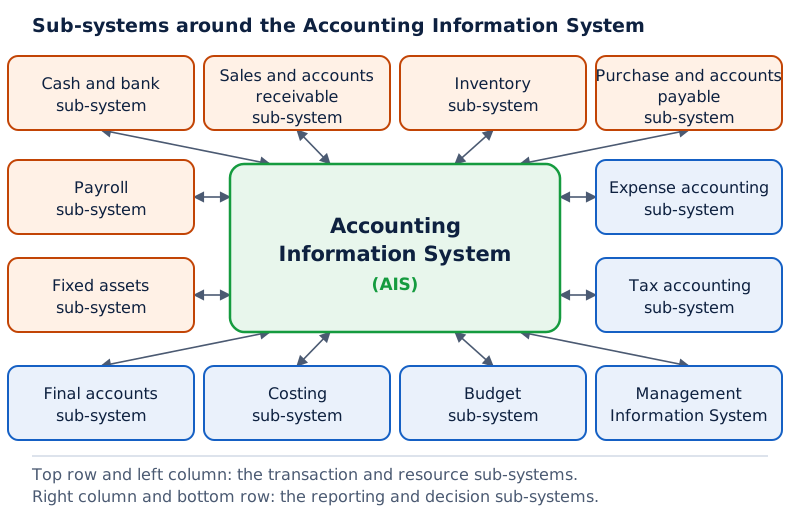
Accounting Information System is in the central box. Surrounding boxes include Cash Sub-system, Sales & Receivable Sub-system, Inventory Accounting Sub-system, Payroll Accounting Sub-system and Management Information System. Arrows connect the central system and surrounding boxes.
Drawn by One Young India. See Fig. 1.4 in your NCERT textbook
How do the remaining AIS sub-systems support reporting and decisions?
The remaining parts of AIS organise expenses, meet tax requirements, prepare final accounts, ascertain costs and support budgeting and management. These functions complement the transaction and resource sub-systems, creating an integrated flow of accounting information.
How are expenses, taxes and final accounts handled?
The expense accounting sub-system records expenses under broad groups: manufacturing, administrative, financial, selling and distribution, and others. These labels classify expenses by the business activity or function to which they relate.
The tax accounting sub-system handles tax compliance requirements, meaning the accounting work needed to meet tax obligations. This sub-system is used in large organisations. Its purpose is distinct from recording all expenses or preparing the final financial statements.
The final accounts sub-system prepares the profit and loss account, balance sheet and cash flow statement for reporting. Final accounts bring together the results of accounting processing into the statements used to report business performance and position.
How do costing, budgeting and MIS differ?
The costing sub-system ascertains the cost of goods produced. It links to other accounting sub-systems to obtain information on materials, labour and other expenses. It also generates information about changes in cost during the period under review.
The budget sub-system prepares the budget for the coming financial year and compares actual performance with the current budget. A budget is a financial plan; actual performance is the result achieved. The comparison connects the plan with the business's recorded results.
MIS generates and processes reports vital for management decision-making. The information system should be flexible enough to provide customised reports, meaning reports adapted to the needs of particular users or managerial functions.
These functions include planning, organising, staffing, oversight, control and decision-making. They cover operational decisions about routine work, functional decisions within business functions and strategic decisions about broader direction. Thus, the information requirements extend beyond a single standard financial report.
There are twelve sub-systems in this overview: cash and bank; sales and accounts receivable; inventory; purchase and accounts payable; payroll; fixed assets; expense accounting; tax accounting; final accounts; costing; budget; and management information. Their distinct roles explain how AIS brings different accounting activities together.
Glossary
- Computerised Accounting System — A system using hardware and software to process accounting transactions and produce records and reports.
- Transaction — A record of resources flowing into and out of a business.
- Data item — The smallest named unit of data within an information system.
- Information — The meaningful result of processing data for the requirements of a user or decision maker.
- Procedure — A logical sequence of actions followed to perform a particular task.
- Accounting cycle — The processes involved in identifying, measuring and communicating accounting information.
- Scalability — The capacity to change data processing volume with changes in the size of the business.
- Codification — Assignment of identification marks using letters or figures within a suitable coding structure.
- Sequential code — A code whose numbers or letters are assigned in consecutive order.
- Block code — A code belonging to a sub-range allocated to a specific group.
- Mnemonic code — A code using letters or abbreviations as symbols to identify information.
- Data audit — A feature identifying who changed original data and what changes were made.
- Encryption — Scrambling information to make its interpretation extremely difficult, almost impossible.
- Accounting Information System — An integration of sub-systems that carry out different accounting information functions.
- Management Information System — A system generating and processing reports vital for management decision-making.
Common errors and misconceptions
- Misconception: CAS means printing financial statements on a computer. Correct: It processes accounting transactions using hardware and software to produce accounting records and reports.
- Misconception: Data and information have permanently separate identities. Correct: Information at one level may become data for further processing at another level.
- Misconception: Computerisation removes the accounting cycle. Correct: The cycle from analysing transactions to preparing financial statements can be processed through computers.
- Misconception: The coding gaps between 11 and 13 or between 21 and 23 must be corrected. Correct: The example deliberately leaves gaps in the second digit to provide flexibility.
- Misconception: Every block code must be sequential within its range. Correct: In most of the uses of block codes, numbers within a sub-range follow sequential coding.
- Misconception: Password security, data audit and encryption are interchangeable. Correct: They control access, identify changes and scramble information, respectively.
- Misconception: Power interruptions necessarily destroy accounting data. Correct: Data may be lost or corrupted due to power interruptions; the statement identifies a risk.
- Misconception: CAS can produce any report without preparation. Correct: Un-programmed and un-specified reports cannot be generated.
Exam-style questions with model answers
Q1. Define a Computerised Accounting System and state what it produces. [2 marks]
- A Computerised Accounting System processes accounting transactions through computer hardware and software.
- It produces accounting records and reports, including journals, ledgers, trial balance, balance sheet and profit and loss account.
Q2. Days worked are 30 and the rate is Rs. 50 per day. Identify the data and calculate the information produced as the amount to pay. [2 marks]
- The data are the inputs: 30 days worked and a rate of Rs. 50 per day.
- Multiplying them gives the information: amount to pay = 30 × Rs. 50 = Rs. 1500.
Q3. Explain password security, data audit and data vault as three security features of CAS. [3 marks]
- Password security controls system access through a key or code. User rights follow organisational policy, so access may be allowed to one data set and denied to another.
- Data audit identifies who changed original data and what changed, helping fix responsibility and maintain data integrity.
- Data vault adds encryption, scrambling information so that interpretation becomes extremely difficult, almost impossible.
Q4. Explain four limitations of CAS software. [4 marks]
- Rapid technological obsolescence requires investment within shorter periods as existing technology becomes outdated.
- Power interruptions may cause accounting data to be lost or corrupted, creating a risk to stored records.
- Accounting data are prone to hacking, so computerisation does not remove the risk of unauthorised interference.
- Un-programmed and un-specified reports cannot be generated; report generation depends on provision for the required report.
Q5. Explain the five salient features required in CAS software. [5 marks]
- Simple and integrated: CAS automates and integrates sales, finance, purchases, inventory and manufacturing, rapidly providing accurate, up-to-date business information.
- Transparency and control: It provides sufficient planning time, improves data access and user satisfaction, and gives greater visibility of day-to-day business operations.
- Accuracy and speed: User-definable templates support fast, accurate transaction entry and help generate the desired documents and reports.
- Scalability: Processing volume can change with business size, allowing the software to serve different sizes and types of organisation.
- Reliability: The critical financial information generated by CAS is accurate, controlled and secured, supporting dependable accounting information.
Q6. Construct and explain a student code using field widths School 2, Entry-year 2, Stream 1, Class 2, Section 1 and Student 2. The student is in the sixth school, entered Class XII in 2008, studies Science Non-Biology with stream code 1, belongs to Section-B with section code 2, and has roll number 54. [6 marks]
- School: The two-digit school field is 06, representing the sixth school. Its initial zero preserves the required field width.
- Entry-year: The two-digit entry-year field is 08, representing the given year 2008 in which the student entered the class.
- Stream: The one-digit stream field is 1, the code supplied for the Science Non-Biology Group in this question.
- Class: The two-digit class field is 12, representing Class XII and following the stream field in the coding structure.
- Section: The one-digit section field is 2, because the question specifies code 2 for Section-B.
- Student: The final two-digit field is 54, the roll number. In the specified order, the complete code is 06 08 1 12 2 54.
Q7. Explain sequential, block and mnemonic coding using these examples: CL001, CL002 and CL003; dealer blocks 100 - 199 for Small Pumps and 200 - 299 for Medium Pumps; and SJ for Sales Journals. [3 marks]
- Sequential: CL001, CL002 and CL003 follow consecutive order. Such codes facilitate source document searches and identification of missing document numbers.
- Block: The two dealer ranges assign different sub-ranges to different groups. In most uses, numbers within a sub-range follow sequential order.
- Mnemonic: SJ uses letters as an abbreviation for Sales Journals, symbolically identifying the information rather than allocating a numeric range.
Q8. Distinguish one-time activities from recurring activities in using CAS, giving examples of each. [2 marks]
- One-time activities create organisation details, the accounting year and ledger types, also called creating master files.
- Recurring activities include entering transactions from vouchers and generating reports such as ledgers, trial balance and financial statements.
Key takeaways
- CAS combines people, procedures, data, hardware and software to process transactions and produce accounting records and reports.
- Data become information through processing; information at one level may serve as data at another.
- The accounting cycle connects transaction analysis, journal recording, ledger posting, trial balance, adjustments and final financial statements.
- CAS software should be simple and integrated, transparent, accurate and fast, scalable, and reliable.
- Account coding follows the hierarchy of groups and sub-groups; deliberate gaps in codes provide flexibility.
- Sequential codes follow consecutive order, block codes allocate ranges, and mnemonic codes use letters or abbreviations.
- Password security controls access, data audit identifies changes, and data vault provides additional protection through encryption.
- AIS integrates twelve specialised sub-systems; these may be implemented through CAS to support accounting and management information needs.
Test yourself
What four data elements form an accounting transaction?
They are the account name, accounting code, transaction date and amount.
What does scalability mean in CAS?
It means changing the volume of data processing in line with changes in business size.
Why does the example use 13 after 11?
The gap in the second digit is deliberately provided for flexibility.
What should be decided before allocating individual codes?
Decide the coding structure after identifying the hierarchy and the attributes requiring representation.
What information does data audit reveal?
It reveals who changed the original data and what changes were made.
What does the inventory sub-system record?
It records items purchased and issued with their price, quantity and date, and reports inventory position and valuation.
How does the costing sub-system obtain necessary information?
It links with other accounting sub-systems for information about materials, labour and other expenses.
What does the budget sub-system do?
It prepares the coming financial year's budget and compares actual performance with the current budget.
Write about it
Turn a question from this chapter into a paper.
The Writing Studio has a structure guide, a rubric and citation tools for 15 formats, from essays to research papers. Drafting is free with an account. Learnacy Essential adds feedback from an AI writing coach and submission to The OYI Review.
Learnacy Essential is ₹1,499 for the year. Publication depends on review and is not guaranteed.