
Use of Spreadsheet in Business Applications | CBSE Class 12 Accountancy Notes
On this page

This note covers spreadsheet applications in payroll accounting, salary components and deductions, template design, asset accounting, depreciation methods, fixed asset schedules, and loan repayment calculations.
How does a spreadsheet support payroll accounting?
Payroll accounting covers maintaining employee salary data, calculating earnings and deductions, and preparing the information needed for payment. Salary is paid on a predetermined date within the employee's contract and the organisation's personnel policy in force from time to time.
The calculation depends on days worked, the employee's pay grade, applicable allowances and deductions. An allowance is an earning component added for a stated purpose; a deduction is an amount subtracted when arriving at the salary payable.
What information and outputs are required?
- Maintain payroll data: record the employee number, name, attendance, basic pay, applicable allowances and deductions. These records supply the values from which salary calculations begin.
- Compute periodic payroll: calculate earning and deduction components using the relevant formulae. Include leave without pay, meaning leave for which salary is not payable, and unauthorised absence where applicable.
- Prepare salary documents: produce the salary statement and individual salary slips, which show the results of the payroll calculations.
- Prepare advice to the bank: provide the net salary to transfer to each employee's bank account and information on salary-related statutory payments such as provident fund and tax.
A statutory payment is one required under the relevant law. The payroll period identifies the month and year to which the calculation belongs. Attendance and rates must therefore relate to that period rather than being treated as unrelated entries.
A spreadsheet template is the planned layout of columns, input cells and formula cells. A cell is a spreadsheet location identified by its column and row. Planning the template allows entered values to produce corresponding calculated results.
The same approach serves other business applications: identify the required information, distinguish directly entered values from calculated values, and arrange the outputs needed for reporting. A salary statement, a depreciation calculation and a loan repayment calculation use different formulae but share this planning process.
What are the earnings and deductions in a salary calculation?
Basic Pay (BP) is pay in the pay scale plus Grade Pay, excluding Special Pay, a separately identified pay component. Grade Pay (GP) is the pay added according to the employee's designation and applicable pay band or scale. Dearness Pay (DP) is the portion of Dearness Allowance declared merged with Basic Pay.
Dearness Allowance (DA) compensates for reduced purchasing power caused by price rises. It is granted periodically by the Government as a percentage of Basic Pay plus Dearness Pay, if applicable. The condition “if applicable” matters when identifying the calculation base.
| Earning component | Purpose or meaning |
|---|---|
| House Rent Allowance (HRA) | Amount facilitating the employee's acquisition of residential accommodation on lease. |
| Transport Allowance (TRA) | Amount facilitating travel to the place of work. |
| Other earnings | May include Education Allowance, Medical Allowance, Washing Allowance or another allowance declared from time to time. |
Which amounts are deducted?
Professional Tax (PT), applicable in some states, is a statutory deduction under state legislation. Provident Fund (PF) is a statutory social-security deduction, described as a percentage of Basic Pay plus Dearness Pay, if applicable.
Tax Deduction at Source (TDS) is the monthly deduction towards an employee's income tax liability. It essentially apportions the yearly liability over 12 months. It is usually a fixed monthly amount, rather than necessarily remaining unchanged throughout the year.
In the last quarter, employees' investment details permissible for tax deduction are received to calculate quarterly and yearly income tax liability more accurately. This connects the regular monthly deduction with the calculation for the year.
Recovery of Loan Instalment (LOAN) is the amount deducted towards an employee's loan. Other deductions may include recovery of an advance against salary, a food grain advance or a festival advance. Such items are separate from the earning components.
Note: Allowance rates, deduction bases and employee categories belong to the particular payroll rules being applied. For a numerical calculation, establish the given base and rate for each component before combining the amounts.
Earnings and deductions should remain distinguishable in the template. A component such as House Rent Allowance increases earnings, whereas a loan recovery contributes to deductions. Recording both as undifferentiated amounts would obscure the calculation of the employee's final payment.
How are effective attendance, gross salary and net salary calculated?
Number of Days in a Month (NODM) is the month's day count. Number of Effective Days Present (NOEDP) is that count less leave without pay and unauthorised absence. Basic Pay Earned (BPE) is Basic Pay adjusted for these effective days.
NOEDP = NODM − leave without pay − unauthorised absence
BPE = BP × NOEDP / NODM
Here, × means multiplication, / means division, − means subtraction, + means addition, and = expresses equality. The symbol ₹ denotes rupees. The attendance deductions in the first formula are measured in days. In spreadsheet formulae, * represents multiplication. A percentage, written %, expresses a rate per hundred.
How do the earning components combine?
DA = BPE × applicable DA rate
HRA = BPE × applicable HRA rate
Transport Allowance can be a fixed amount or calculated on a percentage basis. Total Earnings (TE), also labelled gross salary in the illustrated payroll, combines the earning components used in that layout.
TE = BPE + DA + HRA + TRA
Total Deductions (TD) combines the deductions included in the calculation. Net Salary (NS) is the amount payable after subtracting those deductions from Total Earnings.
PF = BPE × PF rate
TD = PF + TDS + LOAN
NS = TE − TD
Worked example 1. A supervisory employee has Basic Pay ₹34,000, no deduction days in a 28-day month, DA at 35% of BPE, HRA at 40% of BPE and TRA ₹1,000. PF is 12% of BPE, TDS ₹6,800 and loan recovery ₹2,400. Find gross and net salary.
Answer: Effective days = 28 − 0 = 28; BPE = ₹34,000 × 28 / 28 = ₹34,000. DA = ₹11,900 and HRA = ₹13,600. Gross salary = ₹34,000 + ₹11,900 + ₹13,600 + ₹1,000 = ₹60,500.
PF = ₹4,080; total deductions = ₹4,080 + ₹6,800 + ₹2,400 = ₹13,280. Net salary = ₹60,500 − ₹13,280 = ₹47,220.
The order follows the dependencies between values: attendance determines BPE, BPE supplies the base for percentage earnings and PF, and the totals determine net salary. Entering a final salary directly would not show these intermediate calculations.
How should a payroll template use cell references and conditions?
The payroll example for M/s XYZ Enterprise contains 14 employees. The template separates identification details, attendance, earnings and deductions. Some cells contain direct values, while others contain formulae using values already entered or calculated elsewhere.
A cell reference names a cell by column letter and row number: C12 means column C, row 12. An absolute reference fixes the referenced location when a formula is copied; the dollar signs in $I$3 fix both column I and row 3.
A relative reference changes with the copied formula's position. This distinction allows an employee's own row to change while a shared day count or allowance rate remains fixed. Formula cells therefore need deliberate reference choices.
What does the illustrated column layout contain?
| Columns | Contents | Entry or calculation |
|---|---|---|
| A to E | Employee number, name, type, deduction days and Basic Pay | Values entered directly |
| F to H | Effective days, Basic Pay Earned and Dearness Allowance | Calculated from attendance, pay and rate inputs |
| I to K | House Rent Allowance, Transport Allowance and gross salary | Calculated earnings |
| N to P | Provident Fund, Tax Deduction at Source and loan instalment | PF calculated; TDS and loan instalment entered directly |
| Q and R | Total deductions and net salary | Deductions added; total deductions subtracted from gross salary |
In the formula-table layout, I3 contains the month's days, I4 the DA rate, I5 and I6 the HRA rates, I7 and I8 the transport allowances, and I9 the PF rate. These addresses must correspond to the template actually being used.
The row-12 formulae are F12 = $I$3-D12, G12 = E12*F12/$I$3 and H12 = G12*$I$4. Here D12 holds deduction days, E12 Basic Pay, F12 effective days and G12 BPE. Each formula uses the result or input needed at that stage.
How does a nested IF select an allowance?
IF chooses a result according to a condition. A nested IF places one IF inside another. Employee type “Sup” means supervisory and “Nsup” means non-supervisory; C12 contains the employee type.
The HRA formula is =IF(C12="Sup",G12*$I$5,IF(C12="Nsup",G12*$I$6,0)). It applies the supervisory rate if the first condition holds, tests the non-supervisory category otherwise, and returns zero if neither condition holds.
Transport Allowance uses =IF(C12="Sup",$I$7,IF(C12="Nsup",$I$8,0)). The illustrated fixed amounts are ₹1,000 for supervisory staff and ₹500 for non-supervisory staff. Total earnings then add G12, H12, I12 and J12; net salary subtracts Q12 from K12.
What the figure shows
Payroll inputs and outputs
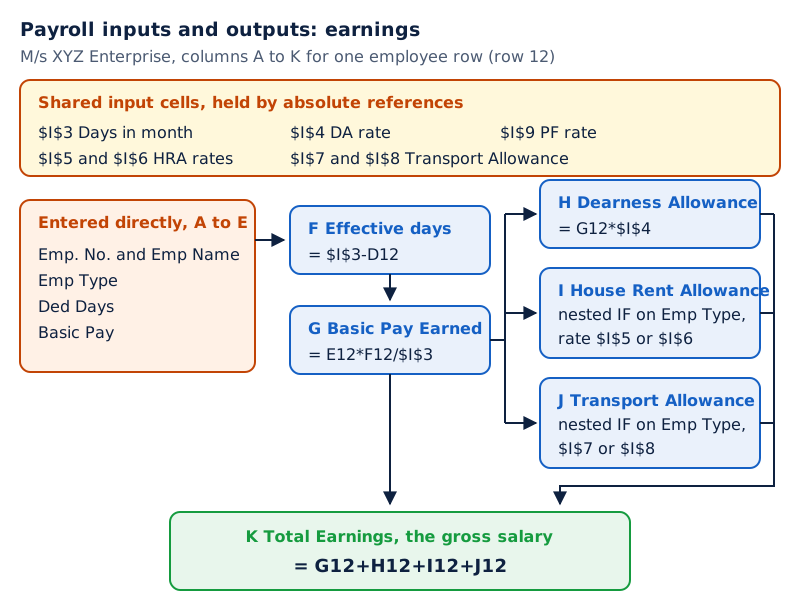
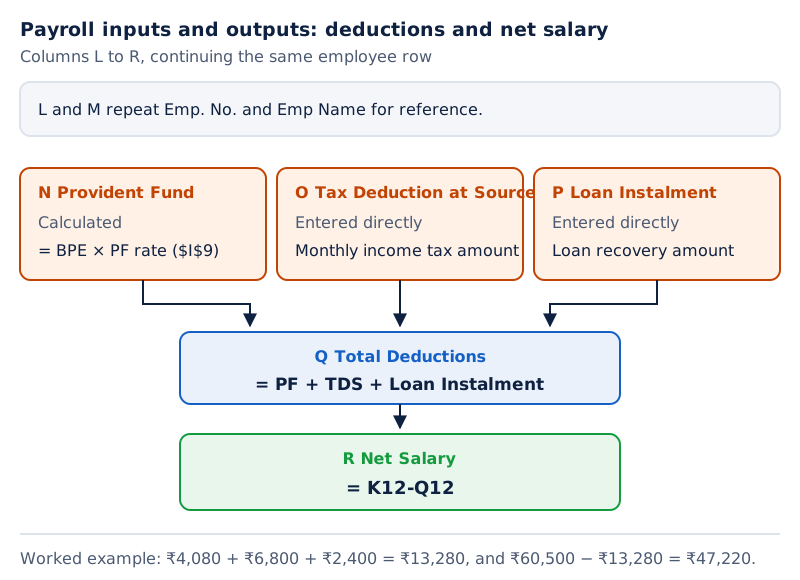
The upper spreadsheet shows the payroll heading, shared rate inputs and employee rows ending in Total Earnings. The lower spreadsheet repeats employee identification beside PF, TDS, Loan Instalment, Total Deductions and Net Salary.
Drawn by One Young India. See Figs. 3.3(a) and 3.3(b) in your NCERT textbook
What does asset accounting record and why is depreciation needed?
Assets are an organisation's resources. They can be classified into fixed and current assets. Current assets are resources held for use, sale or conversion into cash in the normal operating cycle or short term. Fixed assets are long-term resources that provide productive capacity, such as land, buildings, plant and machinery. Fixed assets include both tangible and intangible resources.
Tangible assets have a physical form, shape and size. Intangible assets can add value without a physical dimension, as with patents, copyrights and trade marks. The distinction concerns physical form, rather than whether the resource contributes value.
What is the purpose of depreciation?
Definition: Depreciation recognises the cost of a fixed asset consumed during an accounting period because its useful life extends beyond a single accounting year.
Acquisition cost is the purchase value plus related expenses, including transportation, installation and pre-operating expenses. Installation expenses relate to installing the asset; pre-operating expenses arise before operation. Salvage value is the value realisable at the end of the asset's useful life.
The total depreciation over an asset's life equals acquisition cost less salvage value. Year-to-date depreciation is accumulated depreciation from the date the asset is put to use up to the current accounting year. It is distinct from the depreciation calculated for just one period.
Usually, depreciation is not provided on free hold land. Depreciation calculations follow the organisation's policy. The two basic methods considered are the Straight Line Method and the Written Down Value Method.
Which records and categories are involved?
Asset accounting requires an asset register, meaning the record maintained for assets, a depreciation calculation sheet, and a fixed asset schedule for the balance sheet as part of the annual accounts. The calculation sheet supplies depreciation information needed in that schedule.
The asset categories include goodwill; free-hold and lease-hold land; factory, office and residential buildings; plant and machinery; furniture and fixtures; vehicles; capital work in progress; and others. These are reporting groups within which asset information can be arranged.
Goodwill is an intangible business asset; capital work in progress identifies capital assets still being developed. The spreadsheet task is to organise asset particulars, calculate depreciation and bring the resulting amounts into the fixed asset schedule.
How is straight line depreciation calculated in a spreadsheet?
The Straight Line Method (SLM) divides the total depreciable amount by expected useful life. The total depreciable amount is acquisition cost less salvage value. Expected useful life is the period for which the asset is expected to be useful.
Acquisition cost = purchase value + related expenses
Depreciable amount = acquisition cost − salvage value
SLM depreciation = depreciable amount / expected useful life
When useful life is entered in years, the calculation gives depreciation for a year. The illustrated rate formula expresses straight line depreciation as a percentage of the total depreciable amount: straight line depreciation / total depreciable amount × 100.
What inputs does the asset worksheet need?
The input columns record the asset name, purchase date, installation date, purchase cost, installation expenses, pre-operating expenses, salvage value and life in years. The cost to use column combines the purchase, installation and pre-operating amounts in this layout.
The built-in function SLN calculates straight line depreciation from cost, salvage value and life. A function is a built-in spreadsheet calculation; its arguments are the values supplied to it. These inputs must belong to the asset for which depreciation is being calculated.
CNC means computer numerical control; “CNC Machine” is the asset name used in the worksheet. The table shows the cost inputs, useful life and straight line depreciation for two machines.
| Item | CNC Machine | Packing Machine |
|---|---|---|
| Purchase cost | 877000 | 123000 |
| Installation expenses | 11000 | 8000 |
| Pre-operating expenses | 3000 | 2500 |
| Cost to use | 891000 | 133500 |
| Salvage value | 45000 | 17000 |
| Life in years | 7 | 7 |
| Allowed depreciation | 100% | 100% |
| Depreciation | 120857.14 | 16642.86 |
“CNC Machine” and “Packing Machine” are the asset labels in the illustrated worksheet. The table keeps the cost inputs, life and calculated depreciation together, allowing the relationship between them to be followed for each asset.
Worked example 2. A Packing Machine has purchase cost ₹1,23,000, installation expenses ₹8,000, pre-operating expenses ₹2,500, salvage value ₹17,000 and useful life seven years. Calculate cost to use and annual straight line depreciation.
Answer: Cost to use = ₹1,23,000 + ₹8,000 + ₹2,500 = ₹1,33,500. Depreciable amount = ₹1,33,500 − ₹17,000 = ₹1,16,500. Annual depreciation = ₹1,16,500 / 7 = ₹16,642.86, expressed to two decimal places.
What the figure shows
Straight line depreciation worksheet
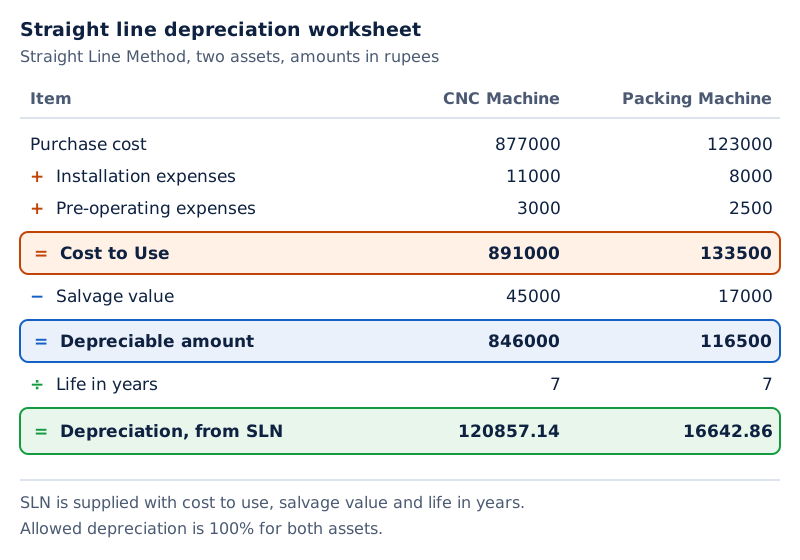
The upper part lists two machines with purchase and installation details and Cost to Use. The lower part repeats the asset names beside Salvage Value, Life in Years, Allowed Depreciation and Depreciation.
Drawn by One Young India. See Figs. 3.5(a) and 3.5(b) in your NCERT textbook
The two parts form one calculation layout. Repeating the asset names helps connect each asset's cost information with its depreciation inputs and result, even when the worksheet is displayed in separate parts.
How does written down value depreciation differ from straight line depreciation?
The Written Down Value (WDV) Method uses current book value as the base for depreciation in the next period. Book value is the asset value remaining after accumulated depreciation. WDV is also called the Declining Balance (DB) Method.
The spreadsheet function DB calculates depreciation using this method. SLM begins with a total depreciable amount spread across useful life; WDV uses the current book value as its calculation base. The choice of method therefore affects the depreciation calculation.
What are the DB function's arguments?
| Argument | Meaning | Column in the formula-table layout |
|---|---|---|
| Cost | Initial cost of the asset | G |
| Salvage | Salvage value at the end of useful life | H |
| Life | Life of the asset in years | I |
| Period | Period in years for which depreciation is calculated | J |
| Month | Number of months in the first year | K |
The formula =DB(G5,H5,I5,J5,K5) uses those five inputs from row 5. Cost to use in G5 is calculated as =D5+E5+F5, where D5, E5 and F5 contain purchase cost, installation expenses and pre-operating expenses respectively.
How are dates used in the calculation?
The worksheet also needs an installation date and a first-year ending date. MONTH returns the month from a date, YEAR returns its year, and DATE constructs a date from year, month and day. AND requires the combined conditions to hold.
- Record the installation date in C5 and the current year-end date in F3. The absolute reference $F$3 keeps the reporting date fixed when the formula is copied.
- Determine the depreciation period. For installation after March, use the current year minus the installation year; otherwise take one additional year.
- Determine the first year's ending date. For installation between January and March, use 31 March of that year; otherwise use 31 March of the next year. Place this date in L5.
- Calculate first-year months using =ROUND((L5-C5)/30,0). ROUND rounds the calculated value; the final zero requests zero decimal places in this formula.
- Pass cost, salvage value, life, period and first-year months to DB. The period identifies the depreciation year being calculated, whereas life records the asset's total expected useful life.
What the figure shows
Declining balance calculation
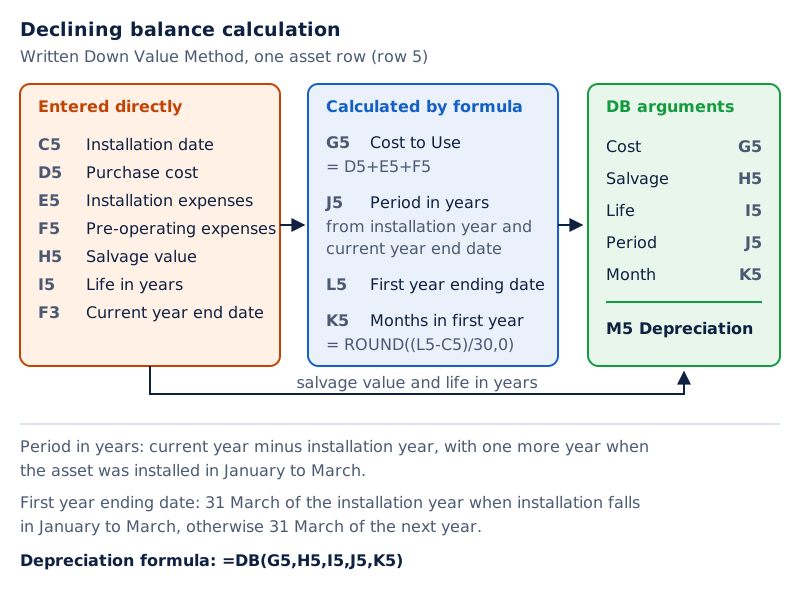
The first worksheet part shows asset costs and dates. The second repeats the machine names and shows salvage value, life, period, first-year months, first-year ending date and depreciation.
Drawn by One Young India. See Figs. 3.8(a) and 3.8(b) in your NCERT textbook
The first-year month calculation uses the displayed division by 30 and rounding rule. The period and month inputs have different roles, so recording the useful life alone does not supply all the information required by this DB layout.
How does the fixed asset schedule combine cost and depreciation?
A fixed asset schedule reports asset information as part of the balance sheet. It brings together the gross block, meaning asset amounts before deducting depreciation, accumulated depreciation, and the net block, meaning gross block less accumulated depreciation.
The illustrated schedule separates opening balances, additions or adjustments, deductions or adjustments, and closing balances. An opening balance is the amount at the beginning of the period; a closing balance is the amount at its end.
Which calculations connect the three parts?
Closing gross block = opening gross block + additions − deductions
Closing depreciation = opening depreciation + additions − deductions
Net block = gross block − accumulated depreciation
Depreciation additions are transferred from the depreciation computation worksheet. Other specified balances and adjustments are entered directly. The opening and closing net blocks each require gross block and depreciation from the same date.
In the formula-table layout, columns B to E hold gross block information, F to I hold depreciation information, and J and K hold net block information. The layout therefore shows both movements during the year and the resulting balances.
Worked example 3. Office and Other Equipment has opening gross block 2894.00, additions 616.00 and deductions 3.00. Opening depreciation is 868.20, depreciation additions 350.70 and deductions 0.00. Calculate closing gross block, closing depreciation and closing net block in the schedule's stated amounts.
Answer: Closing gross block = 2894.00 + 616.00 − 3.00 = 3507.00. Closing depreciation = 868.20 + 350.70 − 0.00 = 1218.90. Closing net block = 3507.00 − 1218.90 = 2288.10.
What the figure shows
Fixed asset schedule
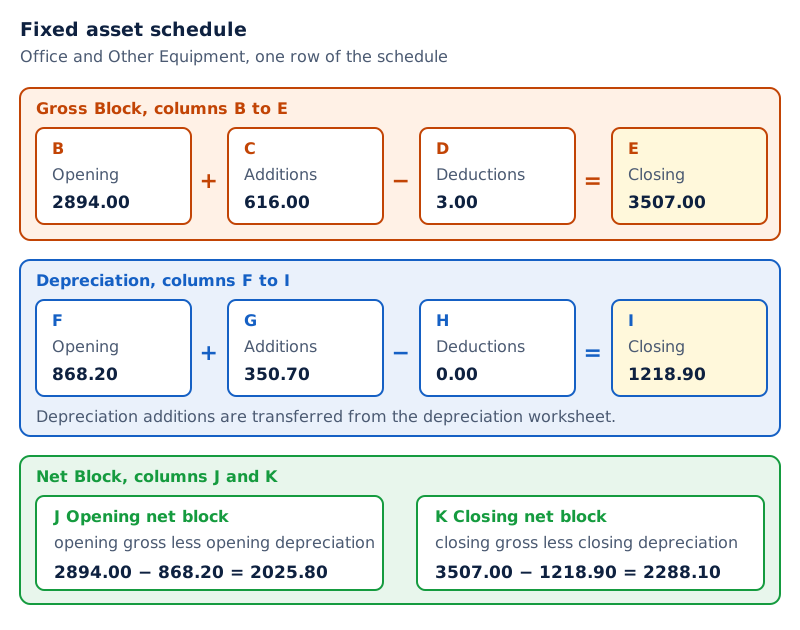
The first part lists asset descriptions beside opening gross amounts, additions, deductions and closing gross amounts. The continuation repeats those descriptions alongside depreciation movements and opening and closing Net Block columns.
Drawn by One Young India. See Figs. 3.10(a) and 3.10(b) in your NCERT textbook
The schedule is an output report, while the depreciation worksheet performs a supporting calculation. Keeping their roles clear helps explain why a depreciation addition is transferred into the schedule rather than independently entered as another unrelated figure.
What information does PMT need for a loan repayment calculation?
Definition: A loan is borrowed money, called the principal amount, taken for a specified period at a pre-specified interest rate. Repayment takes place through periodic, usually monthly, instalments over the repayment period.
Interest is the amount charged for borrowing; an instalment is one of the periodic repayments. The PMT function is a built-in financial function used to calculate loan repayments. A financial function performs calculations involving financial values such as loans and payments.
Calculating repayment instalments is an iterative process, meaning a process involving repeated calculations. The spreadsheet's built-in function allows the required repayment calculation to be performed from the specified loan information.
What does each argument mean?
| PMT argument | Meaning |
|---|---|
| Rate | Interest rate per period for the loan. |
| Nper | Total number of payments; its time unit must match the interest rate's time unit. |
| Pv | Present value, meaning the loan amount in this application. |
| Fv | Future value, meaning the balance remaining at the end of the loan period. |
| Type | Payment timing: 1 means the beginning of the period and 0 means its end. |
Present value (PV) therefore identifies the amount of the loan at the start, while future value (FV) identifies the ending balance in this application. These are different arguments even when they appear in the same function.
The function's argument order is Rate, Nper, Pv, Fv and Type. A correct amount entered in the wrong position does not describe the intended loan. The meanings of the arguments are therefore as important as remembering the function's name.
Note: FV is taken as zero because the balance payable at the end of the loan period will be zero, assuming that repayments are made on a regular basis. Keep this assumption attached to the zero ending balance.
The payment timing also needs attention. A value of 1 for Type means beginning-of-period payment; it does not mean monthly repayment. The period comes from the matching units of Rate and Nper, not from the timing flag.
How do the illustrated loan worksheets turn inputs into repayment amounts?
The loan worksheet begins with directly entered information: loan amount, disbursement date, loan period in years, interest rate and future value. The disbursement date is the date the loan is given. The calculated columns then show yearly and monthly instalment amounts.
In the illustrated row-6 layout, A6 contains the loan amount, C6 the loan period in years and D6 the annual interest rate. The formula in F6 is =PMT(D6,C6,-A6,0,1). Its final arguments specify zero future value and beginning-of-period payment.
The minus sign before A6 supplies the loan amount with a negative sign. The displayed yearly instalment is positive. Column G uses =F6/12 to divide that yearly result by 12 and display the monthly allocation used in this illustration.
What do the two examples show?
| Item | Plasma TV loan | Ajay's car loan |
|---|---|---|
| Loan amount | 100000 | 250000 |
| Disbursement date | 01-Apr-07 | 15-May-08 |
| Loan period in years | 2 | 3 |
| Rate of interest | 10% | 11% |
| Future value | 0.00 | 0.00 |
| Yearly instalment amount | 52380.95 | 92165.11 |
| Monthly instalment amount | 4365.08 | 7680.43 |
Worked example 4. Ajay receives a ₹2,50,000 car loan on 15 May 2008 at 11%, repayable over three years in 36 monthly instalments. Use the illustrated worksheet convention: annual PMT inputs, FV zero, Type 1, and the yearly result divided by 12.
Answer: The annual function setup is =PMT(11%,3,-250000,0,1). The displayed yearly instalment is ₹92,165.11 and the displayed monthly allocation is ₹7,680.43. The three-year period supplies the annual PMT calculation; 36 is the stated number of monthly instalments.
Note: Dividing an annual PMT result by 12 is the convention used in this illustration. It is not a general substitute for calculating PMT with monthly periods. A monthly calculation must use an interest rate per month and the total number of monthly payments.
What the figure shows
Loan repayment worksheet
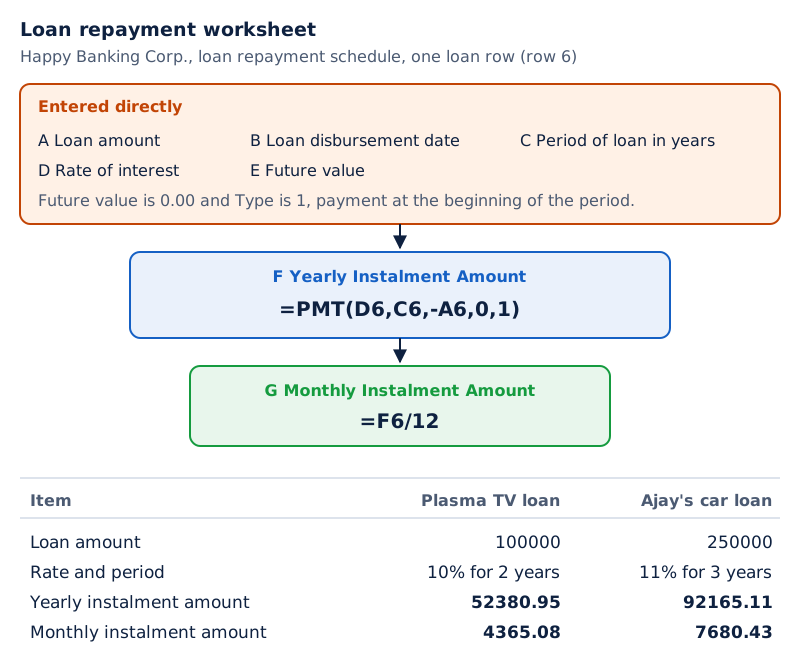
A table headed Happy Banking Corp. contains two loan records. Its columns show the amount, disbursement date, period in years, rate of interest, future value, yearly instalment amount and monthly instalment amount.
Drawn by One Young India. See Fig. 3.13 in your NCERT textbook
For the Plasma TV example, the stated loan is ₹1,00,000 on 1 April 2007, at 10% for two years, repayable in 24 monthly instalments. The monthly allocation in this calculation equals the annual PMT result divided by 12.
Glossary
- Payroll accounting — Maintaining salary data, calculating earnings and deductions, and preparing salary statements, slips and payment information.
- Basic Pay Earned — Basic Pay calculated with reference to effective days present during the payroll month.
- Net salary — Amount payable to an employee after deducting total deductions from total earnings.
- Absolute reference — Cell reference whose specified location remains fixed when its containing formula is copied.
- Nested IF — An IF function placed within another IF function to implement further conditional choices.
- Depreciation — Recognition of the cost of a fixed asset consumed during an accounting period.
- Salvage value — Value realisable from an asset at the end of its expected useful life.
- Straight Line Method — Depreciation method dividing total depreciable amount by the asset's expected useful life.
- Written Down Value Method — Depreciation method using current book value as the base for the next period.
- Net block — Gross asset block less accumulated depreciation at the same specified reporting date.
- Principal — Borrowed amount of money on which the loan repayment calculation is based.
- PMT — Spreadsheet financial function used to calculate repayments from the specified loan and payment parameters.
Common errors and misconceptions
- Misconception: Basic Pay and Basic Pay Earned must be identical. Correct: BPE adjusts Basic Pay for effective days present relative to days in the month.
- Misconception: Gross salary is the amount transferred to the employee. Correct: Net salary is total earnings less total deductions.
- Misconception: Shared rate references should move to the next row when payroll formulae are copied. Correct: Absolute references keep shared inputs fixed; employee-specific relative references can change.
- Misconception: TDS must remain the same fixed amount in every month. Correct: It is usually fixed monthly; investment information helps calculate the yearly liability more accurately.
- Misconception: SLM and WDV use the same depreciation base. Correct: SLM spreads total depreciable amount over useful life; WDV uses current book value for the next period.
- Misconception: DB's Life, Period and Month arguments are interchangeable. Correct: They represent total useful life, the depreciation period being calculated and months in the first year respectively.
- Misconception: Type 1 in PMT means repayment at the end of the period. Correct: Type 1 means beginning-of-period payment; Type 0 means end-of-period payment.
- Misconception: An annual PMT result divided by 12 necessarily equals a PMT calculation made with monthly periods. Correct: The two setups differ; Rate and Nper must describe the intended repayment periods consistently.
Exam-style questions with model answers
Q1. Explain two outputs of payroll preparation apart from the salary calculation itself. [2 marks]
- A salary statement and individual salary slips present the results of the payroll calculations for employees.
- Advice to the bank specifies employees' net salary transfers and salary-related statutory payments such as provident fund and tax.
Q2. An employee's Basic Pay is ₹34,000, with no deduction days in a 28-day month. DA is 35% of Basic Pay Earned, HRA 40% of Basic Pay Earned and Transport Allowance ₹1,000. Calculate Basic Pay Earned, the two percentage allowances, and total earnings. [3 marks]
- Effective attendance is 28 − 0 = 28 days. Basic Pay Earned is therefore ₹34,000 × 28 / 28 = ₹34,000 for this payroll month.
- Dearness Allowance is ₹34,000 × 35% = ₹11,900. House Rent Allowance is ₹34,000 × 40% = ₹13,600, using the same earned-pay base.
- Total earnings combine these amounts with the given Transport Allowance: ₹34,000 + ₹11,900 + ₹13,600 + ₹1,000 = ₹60,500.
Q3. Basic Pay Earned is ₹34,000 and gross salary is ₹60,500. PF is 12% of Basic Pay Earned, TDS is ₹6,800 and loan recovery is ₹2,400, with no other deductions. Calculate PF, total deductions and net salary. [3 marks]
- Provident Fund is based on Basic Pay Earned in the stated calculation: ₹34,000 × 12% = ₹4,080. Gross salary is not the given PF base.
- Total deductions combine Provident Fund, Tax Deduction at Source and loan recovery: ₹4,080 + ₹6,800 + ₹2,400 = ₹13,280.
- Net salary is gross salary less total deductions: ₹60,500 − ₹13,280 = ₹47,220, which is the amount payable to the employee.
Q4. A Packing Machine costs ₹1,23,000 to purchase, with installation expenses ₹8,000 and pre-operating expenses ₹2,500. Its salvage value is ₹17,000 and useful life seven years. Calculate cost to use, depreciable amount and annual SLM depreciation, and name the relevant spreadsheet function. [4 marks]
- Cost to use combines the three stated cost components: ₹1,23,000 + ₹8,000 + ₹2,500 = ₹1,33,500.
- Total depreciable amount excludes the value expected to be realised at the end of useful life: ₹1,33,500 − ₹17,000 = ₹1,16,500.
- Annual straight line depreciation is ₹1,16,500 / 7 = ₹16,642.86, rounded to two decimal places.
- The relevant spreadsheet function is SLN, supplied with the asset's cost, salvage value and useful life.
Q5. Explain the five arguments used by the DB function for depreciation. [5 marks]
- Cost is the initial cost of the asset. In the illustrated asset layout, the cost-to-use calculation combines purchase cost, installation expenses and pre-operating expenses.
- Salvage is the asset's salvage value, meaning the amount realisable at the end of useful life. It is entered as a separate input.
- Life records the asset's expected life in years. This gives the total useful-life input rather than identifying just the year currently being calculated.
- Period identifies the period, in years, for which depreciation is calculated. The worksheet determines this using the installation year and current reporting year.
- Month records the number of months in the first year. The illustrated worksheet derives it from the installation date and first-year ending date.
Q6. Explain the five PMT arguments and the condition supporting zero future value in a fully repaid loan calculation. [5 marks]
- Rate is the interest rate per payment period. Its time unit must be consistent with the periods used to count the repayments.
- Nper is the total number of payments for the loan. It must describe the same period length as that used for the interest rate.
- Pv means present value. In the loan application, this argument represents the loan amount from which the repayment calculation begins.
- Fv means future value, the balance remaining at the end. It is taken as zero assuming that repayments are made regularly over the loan period.
- Type states payment timing within each period. The value 1 means payment at the beginning, while 0 means payment at the end.
Q7. Office and Other Equipment has opening gross block 2894.00, additions 616.00 and deductions 3.00. Opening depreciation is 868.20, depreciation additions 350.70 and deductions 0.00. Calculate closing gross block, closing depreciation and closing net block in the same stated amounts. [3 marks]
- Closing gross block adds the period's additions and subtracts deductions from the opening amount: 2894.00 + 616.00 − 3.00 = 3507.00.
- Closing accumulated depreciation is calculated separately: opening depreciation 868.20 + additions 350.70 − deductions 0.00 = 1218.90.
- Closing net block subtracts accumulated depreciation from gross block at the same closing date: 3507.00 − 1218.90 = 2288.10.
Key takeaways
- Plan the spreadsheet layout first, distinguishing directly entered values from formula cells and identifying the reports needed from the calculation.
- Payroll begins with attendance and pay inputs, calculates earnings and deductions, and ends with the net amount payable to employees.
- Absolute references preserve shared input locations when formulae are copied, while nested IF functions select results for different employee categories.
- Depreciation recognises asset cost consumed during an accounting period; salvage value is the amount realisable at the end of useful life.
- SLN calculates straight line depreciation, while DB uses cost, salvage value, life, period and first-year months for declining balance calculations.
- A fixed asset schedule combines gross block movements, accumulated depreciation and net block, using matching dates for the related balances.
- PMT requires consistent period units, an identified loan amount, an ending balance and a stated beginning-or-end payment timing.
- Zero future value assumes regular repayment; the illustrated yearly instalment divided by 12 must be distinguished from a monthly-period PMT calculation.
Test yourself
How is Basic Pay Earned related to attendance?
It equals Basic Pay multiplied by effective days present, divided by the number of days in the month.
What does an absolute reference preserve when a formula is copied?
It preserves the specified cell location, allowing shared values such as rates to remain referenced correctly.
What is a nested IF used for in payroll?
It tests employee categories in sequence to select the applicable House Rent Allowance or Transport Allowance.
What does salvage value mean?
It is the value realisable from an asset at the end of its useful life.
Which functions correspond to SLM and WDV depreciation?
SLN calculates depreciation by the Straight Line Method; DB is used for the Written Down Value or Declining Balance Method.
How is net block found for a given date?
Subtract accumulated depreciation from gross block, using both amounts as at that same date.
What do Type 1 and Type 0 mean in PMT?
Type 1 means payment at the beginning of each period; Type 0 means payment at its end.
Why is the loan calculation's future value zero?
No balance remains payable at the end of the loan period, assuming that repayments are made regularly.
Write about it
Turn a question from this chapter into a paper.
The Writing Studio has a structure guide, a rubric and citation tools for 15 formats, from essays to research papers. Drafting is free with an account. Learnacy Essential adds feedback from an AI writing coach and submission to The OYI Review.
Learnacy Essential is ₹1,499 for the year. Publication depends on review and is not guaranteed.